NextChat
Lightweight ChatGPT-style web app you can run with one Docker command.
Quick answer
NextChat is a lightweight ChatGPT-style web app you can run with one Docker command, listed under Private ChatGPT-style chat. A typical small-business use: give a small team ChatGPT-style access through one shared company API key. In our own test (NextChat 2.16.1, Docker, Oct 22, 2026) it used about 42 MiB of RAM at idle and up to 57 MiB while working. That is our measurement, not an official figure. The project publishes no official RAM figure. With headroom added to the RAM we measured, a Hetzner Cloud CPX02 (1 vCPU, 1 GB) at about €6.49/month should be enough. That is our estimate from the test, not the project's (server only, excl. VAT). License: MIT, which allows internal business use.
Last updated · facts verified against official docs on · sources
Activity data comes from GitHub and was last refreshed Oct 22, 2026.
What is NextChat?
NextChat (formerly ChatGPT-Next-Web) is a fast, minimal chat interface for OpenAI, Azure and other model APIs, including self-hosted OpenAI-compatible servers. It supports prompt templates ("masks"), Markdown with LaTeX and Mermaid, long-chat compression, MCP tools and a PWA. Chat history is kept in each user's browser rather than on the server.
Where it fits in a 10–200 person business
- Give a small team ChatGPT-style access through one shared company API key
- Front end for a self-hosted model server such as LocalAI or Ollama
- Share prompt templates for recurring tasks like email replies or translations
These use cases are our editorial suggestions, not claims made by the project.
Can a business use NextChat? (license)
| License | MIT |
|---|---|
| Type | Permissive: MIT / Apache-2.0: use, modify and sell with few obligations. |
| Internal business use | Allowed under the license text |
| What to watch | Permissive. Internal and commercial use allowed; keep the license notice. Branding, admin panel and permissions are sold separately as an Enterprise Edition. |
This is a plain-English summary of the license text, not legal advice. Third-party models you run with it have their own licenses.
Data & compliance: does NextChat phone home?
| Telemetry (usage data sent to the vendor) | Not documented |
|---|---|
| Other calls home by default (updates, marketplaces, default cloud services) | Not documented |
| Single sign-on (OIDC / SAML / LDAP) | Not documented |
| Audit log | Not documented |
| Role-based access control (RBAC) | Not documented |
| Data residency / GDPR notes from the project | Not documented |
Checked against the project's own docs and repository on . "Not documented" means we could not find the answer in official sources; it does not mean the feature is missing or that no data is sent. Third-party services you connect (model APIs, vector databases, search engines) have their own data policies. Compare all apps.
What hardware does NextChat need?
The project does not publish a minimum CPU/RAM figure, so we leave the official value blank rather than guess.
Our measurement measured: 42 MiB RAM at idle, 57 MiB while working (NextChat 2.16.1, Oct 22, 2026). Full test results.
No official RAM figures. Stated requirements are NodeJS >= 18 or Docker >= 20.
Tested by SelfHostMap
Measured, not officialWe deployed NextChat 2.16.1 ourselves on using the official Docker instructions, and measured what it actually used. Your numbers will vary with your data, users and hardware. How we test.
| Version / image | yidadaa/chatgpt-next-web:latest → NextChat 2.16.1 (sha256:eaaa469ddeeb…) |
|---|---|
| Test machine | Intel Xeon (Sapphire Rapids class, AVX-512 + AMX), 8 vCPU, 16 GB RAM (shared), GPU: none (CPU only). Debian 13 (trixie), Linux 6.12, Docker Engine 29.9.2. Container capped at 1.0 GiB. |
| RAM at idle measured | 42 MiB · 2 minutes after start, nobody connected. |
| RAM while working measured | 57 MiB · Highest reading while entering the access code and sending one chat message in a browser. The model ran in the separate llama.cpp container, which used about 500 MiB. |
| Image size | 66 MB download, 280 MB on disk once unpacked |
| Data on disk after test | 0 MB · The container wrote only 4 kB. Chats and settings are kept in the browser, not on the server. |
| Time to first start | 0.7 s with the image already downloaded · From docker run until the page answered 200 (Next.js logged "Ready in 54ms"). Including the image download: 2.8 s (download took 2.1 s on our datacenter connection; yours depends on your network). |
Cost based on our test: 57 MiB working RAM × 1.5 + 512 MiB for the OS and Docker ≈ 598 MiB → Hetzner Cloud CPX02 (1 vCPU, 1 GB) at about €6.49/month our estimate. The project itself publishes no RAM figure.
What we ran into
- The server log prints your API key and users' access codes in plain text
[Server Config] using 1 of 1 api key - sk-bench … [Auth] got access code: BenchPass123Fix: Treat docker logs as secret (restrict who can read them, do not ship them to a shared log service), or put NextChat behind your own login.
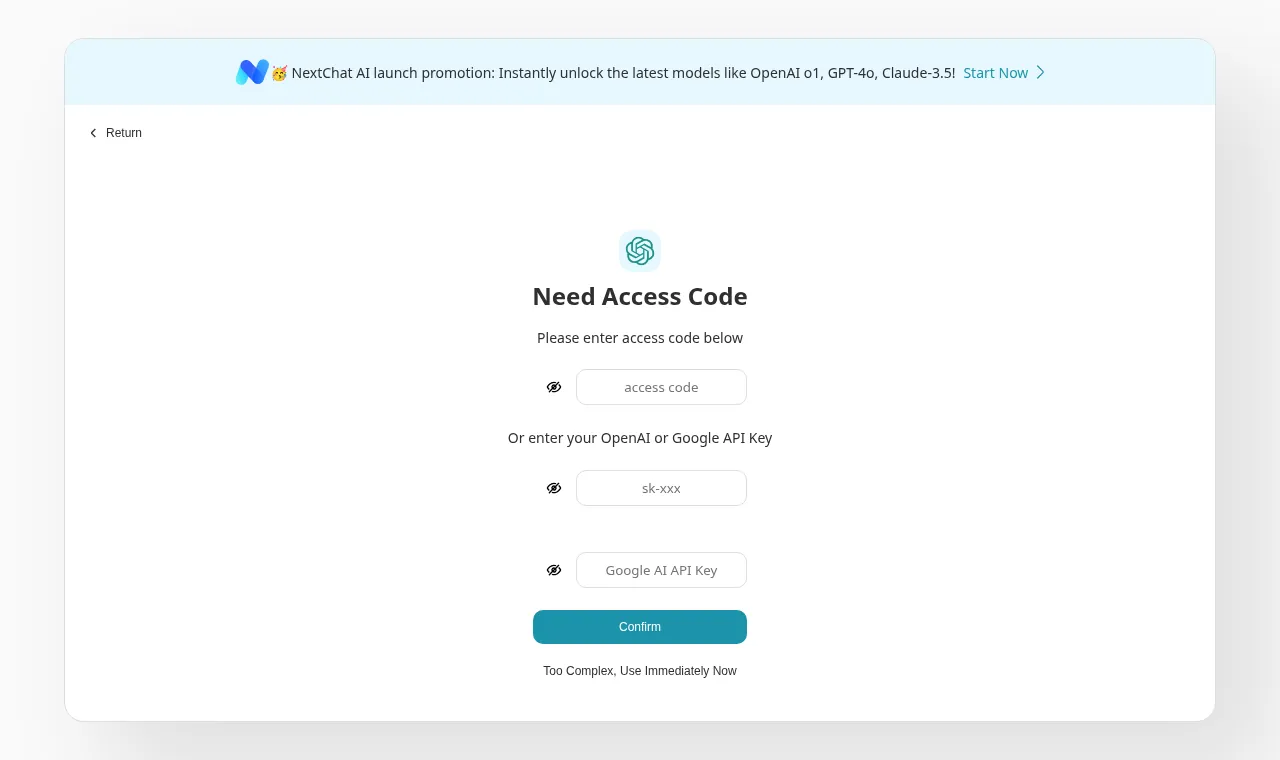
- A banner advertises NextChat's paid cloud service
The self-hosted access-code page showed "NextChat AI launch promotion: Instantly unlock the latest models like OpenAI o1, GPT-4o, Claude-3.5! Start Now".
Fix: Cosmetic. Your users may click it and sign up for a third-party service, so tell them which models you provide.
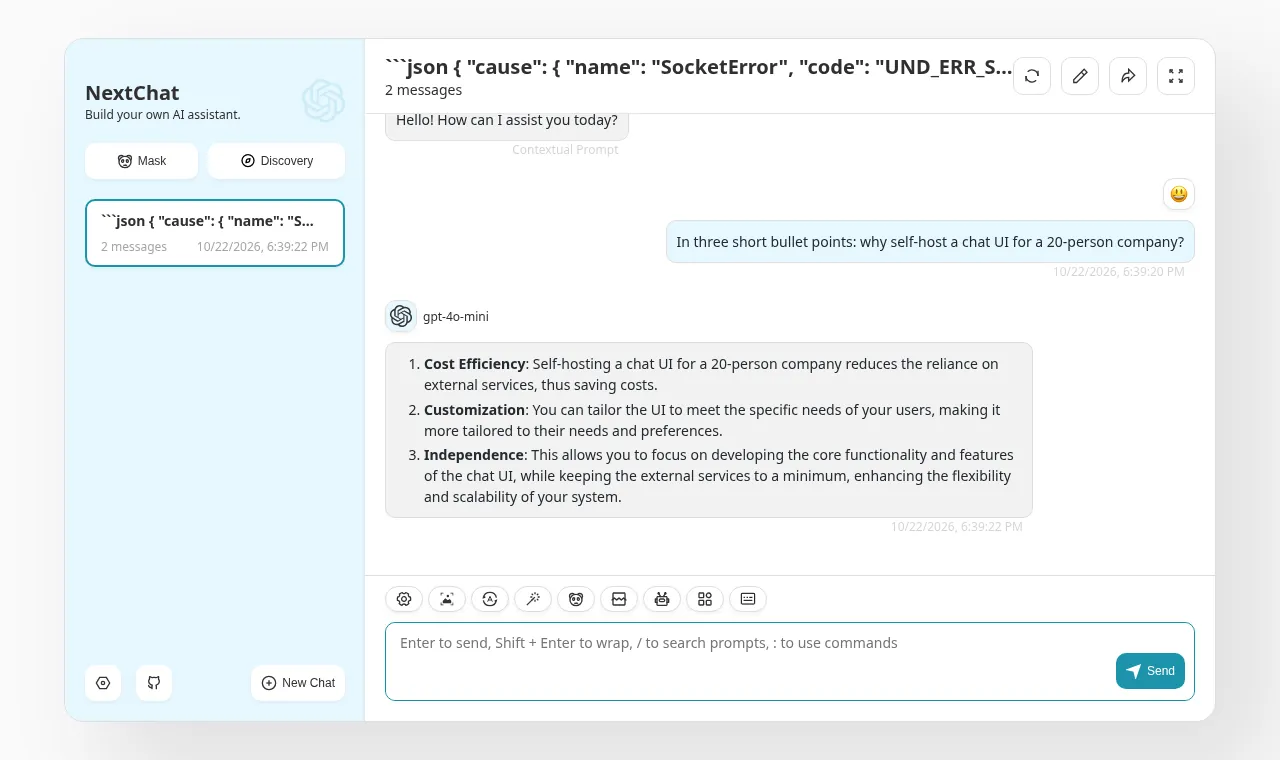
- The model list shows OpenAI models even with a local backend
With BASE_URL pointed at a local server, the answer was still labelled gpt-4o-mini, the default OpenAI model name.
Fix: Set CUSTOM_MODELS (for example -all,+qwen2.5) and DEFAULT_MODEL so users see the model you actually run.
- The automatic chat title request failed against our local backend (caused by our test network)
The chat answer itself streamed fine. The follow-up request NextChat sends to name the conversation failed, and the raw error JSON became the chat title. The llama.cpp log shows no matching request, so we could not pin down the cause; we did not test with a real OpenAI key.
[OpenAI] [TypeError: fetch failed] { cause: [SocketError: other side closed] { code: 'UND_ERR_SOCKET' …Fix: Not resolved in our test. If you see error text as chat titles with a local model, try disabling auto-generated titles in NextChat's settings.
Exact command we ran
docker run -d --name nextchat --memory 1g -p 3000:3000 \
  --add-host=host.docker.internal:host-gateway \
  -e OPENAI_API_KEY=sk-bench -e CODE=BenchPass123 \
  -e BASE_URL=http://host.docker.internal:8080 \
  yidadaa/chatgpt-next-web:latest
Official README command with a 1 GB memory cap. Instead of OpenAI we pointed BASE_URL at the llama.cpp server from our llama.cpp test (Qwen2.5 0.5B on CPU), which speaks the OpenAI API, so no data left the machine.
How much does it cost to host NextChat per month?
The project publishes no official RAM figure, so there is no official-spec estimate. Instead we use the RAM we measured in our own test:
| Based on our test our estimate | 57 MiB working RAM × 1.5 + 512 MiB ≈ 598 MiB → CPX02 (1 vCPU, 1 GB, 20 GB disk) €6.49/mo |
|---|
How we got this: the cheapest Hetzner Cloud Regular Performance (shared AMD vCPU) plan with at least that much RAM, using prices read from www.hetzner.com/cloud/regular-performance on 2026-10-22. "From" monthly price cap shown by Hetzner, excluding VAT. Prices vary by location. Covers the server only; it excludes LLM API usage, backups, extra storage, GPUs and your time. The headroom covers the OS, Docker and spikes; heavier workflows, more users or bigger models need more. Method.
How to deploy NextChat
Method: Docker
docker run -d -p 3000:3000 \
   -e OPENAI_API_KEY=sk-xxxx \
   -e CODE=your-password \
   yidadaa/chatgpt-next-web
From the official instructions: github.com/ChatGPTNextWeb/NextChat#docker-recommended. Always check the source for the current version before you run it.
Known gotchas when self-hosting NextChat
- Access control is limited to shared access passwords (the CODE variable). There are no user accounts, roles or per-user usage limits in the open-source version; set CODE or anyone who reaches the URL can spend your API key. source
- Chats are stored locally in each browser, not on the server, so history does not follow users between devices unless they set up sync. source
- The MCP feature (ENABLE_MCP) requires CODE to be set; every MCP server action checks the access code. source
Alternatives in Private ChatGPT-style chat
- Open WebUI Feature-rich self-hosted chat UI for Ollama and OpenAI-compatible APIs. Compare NextChat vs Open WebUI
- LobeHub (LobeChat) Polished multi-model chat and agent workspace with plugins and knowledge bases. Compare LobeHub (LobeChat) vs NextChat
- LibreChat Multi-provider ChatGPT-style interface with agents, file search and user management. Compare LibreChat vs NextChat
- Jan Offline desktop ChatGPT alternative that runs models on each employee's computer. Compare Jan vs NextChat
NextChat FAQ
How much RAM does NextChat need?
NextChat does not publish an official RAM figure. Stated requirements are NodeJS >= 18 or Docker >= 20. In our own test (NextChat 2.16.1, Docker, Oct 22, 2026) it used about 42 MiB of RAM at idle and up to 57 MiB while working. That is our measurement, not an official figure.
How much does it cost to self-host NextChat?
The software is free to download. The project publishes no official RAM figure. With headroom added to the RAM we measured, a Hetzner Cloud CPX02 (1 vCPU, 1 GB) at about €6.49/month should be enough. That is our estimate from the test, not the project's (server only, excl. VAT).
Is NextChat free for commercial use?
NextChat is licensed under MIT (Permissive). Internal business use is allowed under the license text. Permissive. Internal and commercial use allowed; keep the license notice. Branding, admin panel and permissions are sold separately as an Enterprise Edition. This is a summary, not legal advice.
What are common problems when self-hosting NextChat?
Access control is limited to shared access passwords (the CODE variable). There are no user accounts, roles or per-user usage limits in the open-source version; set CODE or anyone who reaches the URL can spend your API key. Chats are stored locally in each browser, not on the server, so history does not follow users between devices unless they set up sync. The MCP feature (ENABLE_MCP) requires CODE to be set; every MCP server action checks the access code.
What went wrong when SelfHostMap deployed NextChat?
In our test of NextChat 2.16.1 on Oct 22, 2026: The server log prints your API key and users' access codes in plain text. Treat docker logs as secret (restrict who can read them, do not ship them to a shared log service), or put NextChat behind your own login. A banner advertises NextChat's paid cloud service. Cosmetic. Your users may click it and sign up for a third-party service, so tell them which models you provide. The model list shows OpenAI models even with a local backend. Set CUSTOM_MODELS (for example -all,+qwen2.5) and DEFAULT_MODEL so users see the model you actually run.
Is NextChat still maintained?
Yes, it is actively developed. Last commit: Oct 20, 2026. Latest release: v2.16.1 (Jul 29, 2025). Checked Oct 22, 2026.
How do I install NextChat?
The official method is Docker. The exact commands are in the "How to deploy" section above and in the official instructions: https://github.com/ChatGPTNextWeb/NextChat#docker-recommended
What are self-hosted alternatives to NextChat?
Other apps in Private ChatGPT-style chat: Open WebUI, LobeHub (LobeChat), LibreChat, Jan.
Sources
- GitHub repository: github.com/ChatGPTNextWeb/NextChat
- Official documentation: github.com/ChatGPTNextWeb/NextChat#deployment
- License text: github.com/ChatGPTNextWeb/NextChat/blob/main/LICENSE
- Hardware requirements: github.com/ChatGPTNextWeb/NextChat#requirements
- Deploy instructions: github.com/ChatGPTNextWeb/NextChat#docker-recommended
- Gotcha 1: github.com/ChatGPTNextWeb/NextChat#access-password
- Gotcha 2: github.com/ChatGPTNextWeb/NextChat#features
- Gotcha 3: github.com/ChatGPTNextWeb/NextChat#enable_mcp-optional
- Hetzner Cloud pricing (cost estimate): www.hetzner.com/cloud/regular-performance
- GitHub stars, commits and releases: GitHub REST API, fetched
Facts on this page were checked against the project's own repository and docs on 2026-10-22. Spotted something out of date? Tell us.